
Q3map2 Leaks
Original by Neon 2001
The easiest to find a leak is to compile your map, if your construction is suffering from a structural leak, this will produce a pointfile ( mymap.lin ) which will be used to point you to your leak.
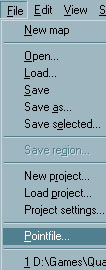
Now go to the file menu and load your pointfile.
this should draw a nice fancy red line all over your level like so, normally taking the fasted path through the BSP tree, from the structural gap to the first chronological entity listed in the .map file.
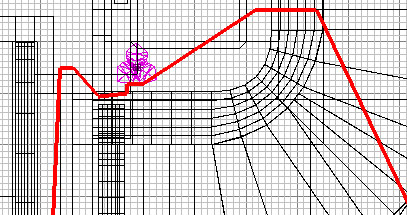
This should highlight where to find the leak. The easiest way to look at the line is to use either the misc menu or use ctrl + shift + k for the next point and ctrl + shift + L for the previous one. you will notice a point where the line goes from inside your map to the void, this is your leak.
How to fix them:
The main way to avoid leaks to start with is just to make sure that all your exterior walls ( walls that make the hull of your map ) are at least 16+ units thick. Or if you're lazy, just hollow a massive box around your map... But in reality, you probably want to fix this optimally.
The Hole.
This is the easiest problem to fix just plug the hole. Make sure that you try to pull around existing brushes. its not worth adding to your brush count just to plug holes if you can move others to fill it.
Thin brushes.
Sometimes if your brushes are too thin they will leak, so make sure that if you are using thin brushes you place a caulked brush behind it to block the bsp process.
Details
Detail brushes are not included in the bsp process so they CANNOT be used to block the hull of your map. if the line goes through a wall and you think eh? err ? press
ctrl + d this will toggle all your detail brushes on/off this way it makes it a lot easier to track down the hole.Curves and patches
They are pretty much the same as detail brushes they dont block the bsp process so if you try to compile you will have a gaping hole. good working practice dictates that you should ALWAYS caulk behind curves anyway, so to be strict you should never run into this problem,
ctrl + p toggles all your curves on and off, make life easier.Entities
If you have an entity that is in the 'void' your map will leak. for example if you have a door that starts half way out of your map, it will leak. if you have a target_speaker or misc_teleporters etc.
Hull textures
Make sure that the exterior hull of your map is not textured with shaders like noclip, weapclip etc. these shaders will not seal your map and will leak bsp into the void.